SMART Plus Tool
The Simplified Methane Assessment and Reporting Tool, or SMART Plus tool, is an innovative, easy-to-use tool that helps improve the accuracy of estimated methane emissions (and other pollutants such as carbon dioxide) from oil & gas operations, both at the facility level and at the national level.
Why it matters
- Methane, a potent greenhouse gas and the primary constituent of natural gas, is a valuable fuel resource; its conservation saves money and improves the environment. Improving the accuracy of estimated methane emissions from oil & gas operations, whether at the facility or national level, can help oil and gas companies and policy makers in a number of ways, including the identification of large sources of methane emissions that were previously overlooked and could be mitigated.
- National level governments may not understand the scope and scale of methane emissions from this sector; improving the accuracy of emissions estimates could help them understand emissions sources and provide appropriate policies and incentives to mitigate these emissions. Countries reporting their annual greenhouse gas (GHG) emissions to the United Nations Framework Convention on Climate Change (UNFCCC) would benefit from having an easy-to-use resource to collect and aggregate this data.
- Private sector facilities can benefit from using a systematic approach to estimate more accurate facility-level emissions that could identify operational inefficiencies and opportunities to reduce emissions.
Who should use it
This Tool is intended to be used by national governments as well as company-level stakeholders in developing countries.
How it works
There are three components of the SMART Plus Tool:
|
Image
|
The SMART Plus Facility Template This Excel-based template estimates facility-level emissions of greenhouse gases (GHGs) including methane, carbon dioxide, and nitrous oxide, as well as criteria air contaminants (CACs) including carbon monoxide, nitrogen oxides, non-methane VOCs, and sulphur dioxide. This template provides a format for collecting appropriate data and estimates total facility-level emissions using default emission factors and equipment component counts as well as user-provided infrastructure and activity data for a given facility. The template also accepts direct measurement data, which, if available, will override emissions calculations and provide a more refined estimate. Users seeking to estimate emissions at multiple facilities can fill out a unique SMART Plus Facility template for each facility. If facility-specific emissions are aggregated across an entire country, the result would produce a national emissions inventory for the oil & gas sector consistent with an IPCC Tier 3 approach. If facility-specific emissions were calculated in this manner for only a representative subset of facilities, this process could yield IPCC Tier 2, or country-specific, emission factors. |
|
Image
|
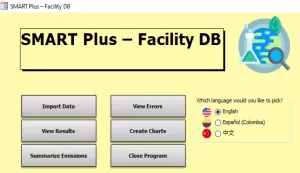
The SMART Plus Database application his beta SMART Plus Database is a Microsoft Access application that can import multiple SMART Plus Facility templates to summarize emissions estimates across facilities and allow users to filter combined emissions profiles by several aspects, such as by industry segment, emissions source, year, or facility. The Database can be used to calculate IPCC Tier 2 emission factors that can be manually copied into the IPCC Inventory Software for the purposes of reporting national GHG inventories to the UNFCCC for Category 1.B.2 (Oil and Natural Gas). These newly developed Tier 2 emission factors can also be imported into the beta SMART Plus IPCC Tier 1/Tier 2 Reporting Template for the purposes of comparing the effect of Tier 1 vs Tier 2 emission factors on the user’s national GHG inventory ahead of making inventory submissions into the IPCC Inventory Software. |
|
Image
|
The SMART Plus IPCC Tier 1/Tier 2 Reporting Template This beta template functions similarly to the IPCC Inventory Software by calculating emissions using an IPCC Tier 1/Tier 2 approach for UNFCCC Category 1.B.2 (Oil and Natural Gas). The template is designed to be used as a decision support tool that allows users to compare pre-populated default IPCC Tier 1 emission factors (from the 2019 Refinement to the 2006 IPCC Guidelines) with Tier 2 emission factors that have been developed either through the use of other SMART Plus tool components or from other studies. Users can implement this tool to understand how the emission factor they select will impact their final inventory submission via the IPCC Software. Version 1.0 of this template includes Tier 1 factors from the 2019 Refinement only; U.S. EPA plans to incorporate original emission factors from the 2006 Guidelines into a later version, providing users the added ability to compare 2006 and 2019 emission factors, in addition to Tier 2 factors. |
Frequently Asked Questions
Who can use SMART Plus?
SMART Plus can be used by national government stakeholders who are responsible for compiling their national GHG inventory for oil and gas systems in accordance with annual or bi-annual UNFCCC reporting requirements under the Paris Agreement. Outputs from the Tool are directly aligned with the IPCC Inventory Software used for submitting GHG inventories to the UNFCCC.
SMART Plus can also assist those who aim to refine their oil and gas sector GHG inventory estimates by developing an Intergovernmental Panel on Climate Change (IPCC) Tier 2, or country-specific, emission factor.
SMART Plus can also be used by company-level stakeholders in developing countries who wish to understand their company-wide or facility-level emissions profile.
What methodology does SMART Plus follow?
The SMART Plus Facility Template incorporates and aligns with the methodology for IPCC Tier 3.
The SMART Plus Database application incorporates standard mathematical approaches for calculating averages; in this case, average emissions.
The SMART Plus IPCC Tier 1/Tier 2 Reporting Template incorporates and aligns with the methodology for IPCC Tiers 1 and 2.
How can I use SMART Plus to create a national inventory for the oil and gas sector?
Users can implement various SMART Plus tool components to meet the needs of their GHG inventory context, which could include:
- Conducting a facility-level GHG emissions assessment, which could be considered aligned with IPCC Tier 3 if all facilities in a given country or jurisdiction are assessed.
- Conducting a Tier 3 approach at a representative set of facilities for the purposes of generating a Tier 2 emission factor for a particular source category.
- Comparing default Tier 1 emission factors (from the 2019 Refinement to the 2006 IPCC Guidelines) with Tier 2 emission factors ahead of submitting data into the IPCC Inventory Software.
How do I use SMART Plus to estimate facility-level emissions?
To estimate emissions at one facility, users can download and complete a single SMART Plus Facility template for that facility. The Facility template is a standalone file that does not require the use of any other SMART Plus components.
How do I use SMART Plus to create an emissions profile across multiple facilities (including for the purposes of conducting an IPCC Tier 3 assessment)?
To estimate emissions across multiple facilities, users must first download the SMART Plus Facility template and then complete a unique template for each individual facility.
Then, users must import each completed Facility template into the SMART Plus Database application. Once imported into the Database, users can view aggregated summaries of emissions and manually copy this data into the IPCC Inventory Software.
If the facilities being assessed are characterized as a representative sample for the entire country or jurisdiction, then this can be considered sufficient to determine an IPCC Tier 2 emission factor for a particular source type at those facilities.
How do I use SMART Plus to develop IPCC Tier 2 emission factors?
To develop IPCC Tier 2 emission factors, start by first identifying an industry segment (for example, Gas Production and Gathering), sub-segment (for example, Onshore), and type of activity parameter (for example, Active gas wells) for IPCC Category 1.B.2, Oil and Natural Gas. Conduct an IPCC Tier 3 assessment at multiple corresponding facilities using a unique SMART Plus Facility template at each facility and then import those templates into the SMART Plus Database Application. Ensure that these facilities are considered representative for the user’s country or jurisdiction.
Follow the User Manual steps to calculate a Tier 2 emission factor with just a few clicks.
What are the available filters that can be used to view results in the SMART Plus database when summarizing emissions across multiple facilities?
Users can view emissions summaries in the SMART Plus Database by selecting filters including year, company, facility, facility type, industry segment, and source category.
Can I visualize my emissions profile using SMART Plus?
Yes. Each of the three SMART Plus components displays emissions profiles using pie charts in addition to providing tabular results.
Where can I learn more about the IPCC Guidelines for estimating GHG inventories from oil and gas systems?
How was SMART Plus developed?
SMART Plus was developed by U.S. EPA under the auspices of GMI and partially funded by the U.S. Department of State’s Transparency Accelerator program to provide GHG inventory technical assistance to developing countries. Version 1.0 of the Facility template has been peer reviewed, and U.S. EPA anticipates conducting peer reviews for Version 1.0 of the Database application and Version 1.0 of the Tier 1/Tier 2 reporting template in early 2025.